 Autumn
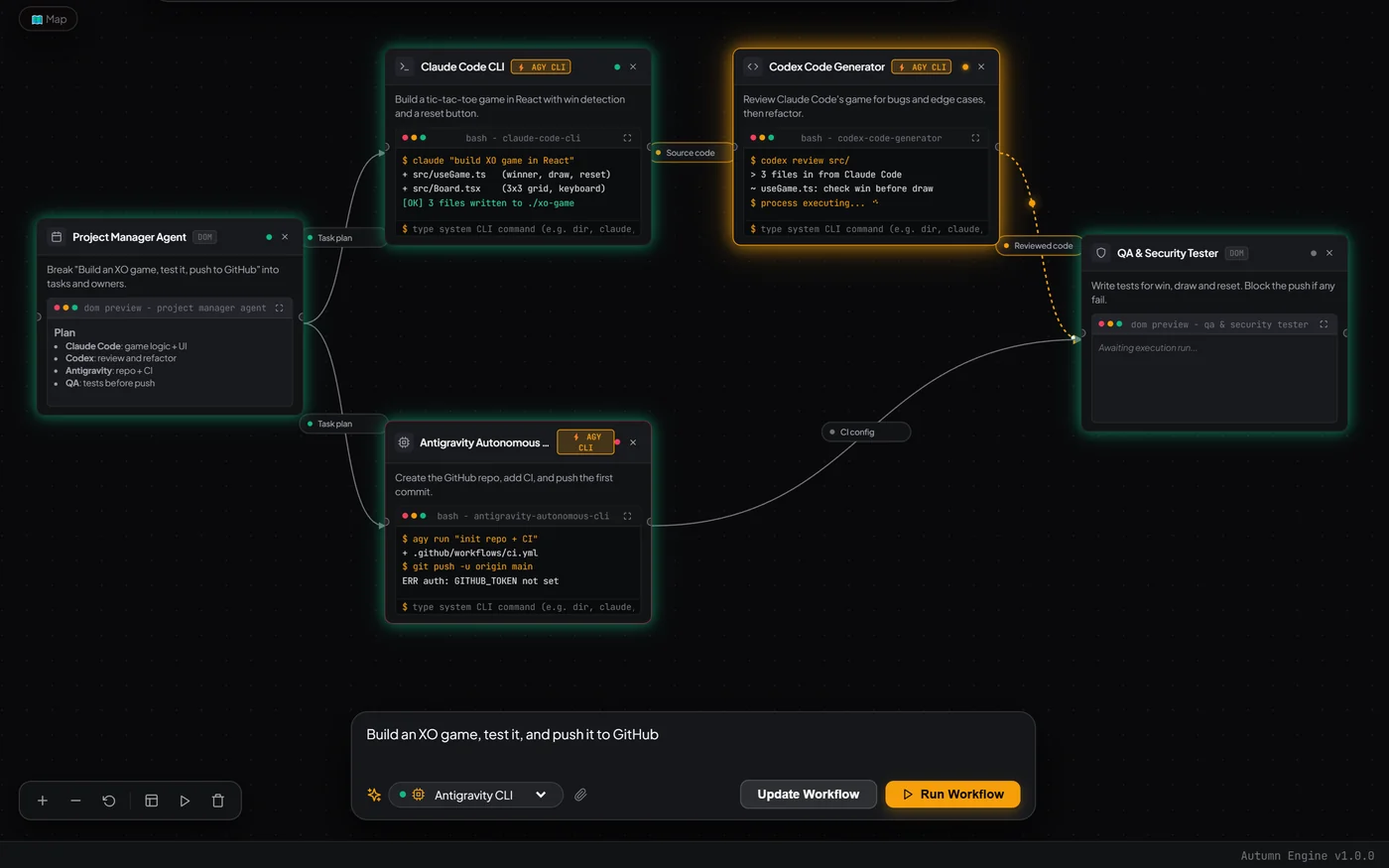
Message one goal, get a whole team
“Build an XO game, test it, push to GitHub.” Autumn turns a plain-language goal into a graph of specialist agents with roles and deliverables. Say “add a QA tester node” to change it.
Claude Code writes, Codex reviews, and you ferry context between three terminals. Autumn wires your agents into one live canvas. One prompt in, the whole team runs, and real code lands on your drive.
Bring the agents and models you already use

Each agent is a node with its status, output and logs visible at a glance. Context moves along the wires.
Other tools make you copy output from one chat window into the next, babysit three terminals, and rebuild context every time a session hits its limit.
With Autumn you describe the outcome once. It plans a graph of agents, connects them and runs them in order. Every agent starts with the work that came before it.
No automations to configure, no YAML, no node-by-node prompt wiring. Describe the goal and edit the graph by talking to it.
“Build an XO game, test it, push to GitHub.” Autumn turns a plain-language goal into a graph of specialist agents with roles and deliverables. Say “add a QA tester node” to change it.
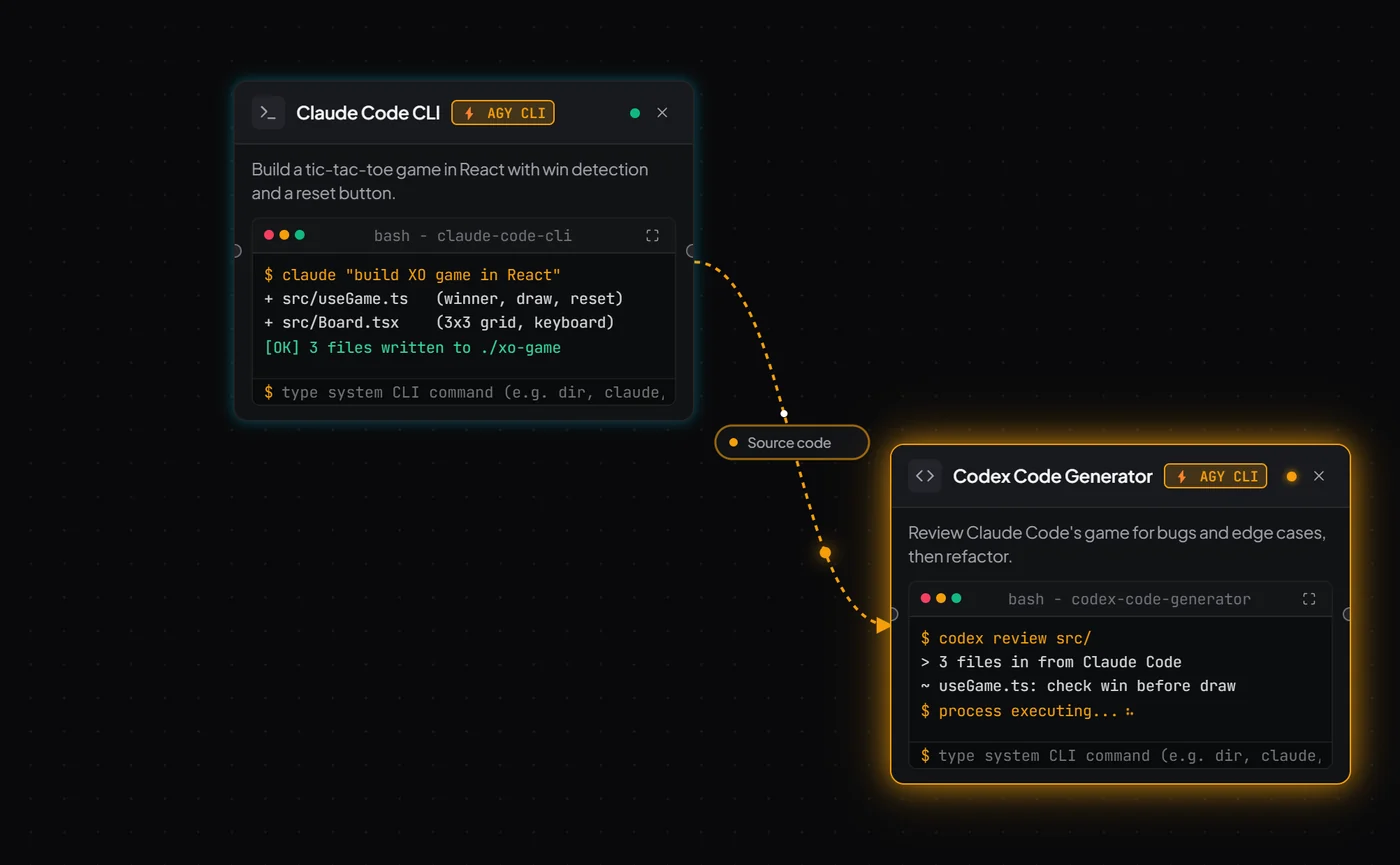
Terminal agents are first-class nodes. Claude Code writes, Codex reviews, Antigravity runs autonomous tasks, and each one sees the others’ full output. No copy-paste in between.
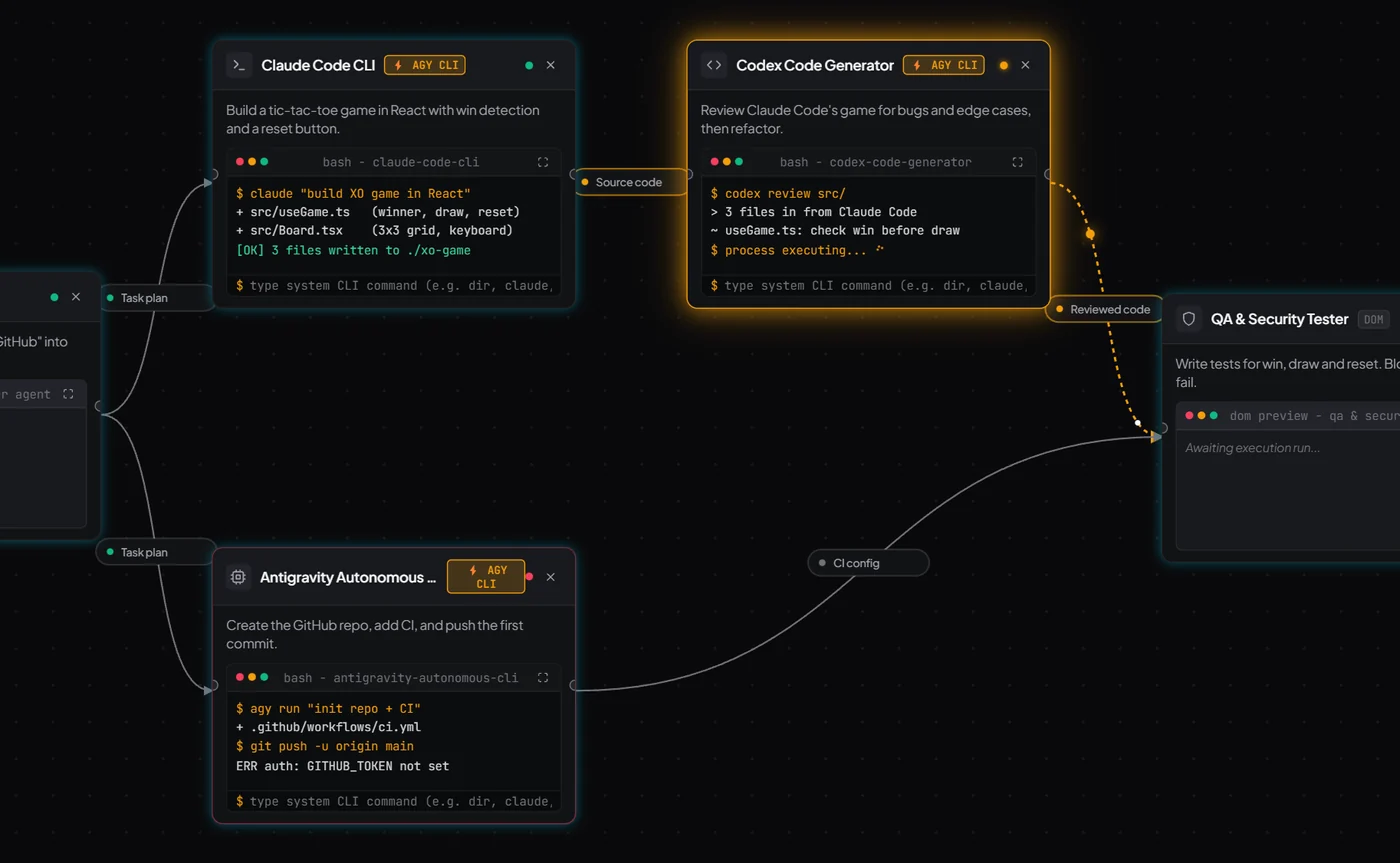
Every node shows idle, working, completed or error, with streaming output and a mini terminal. Timeline replay turns a failed run into something you can read, not reconstruct.
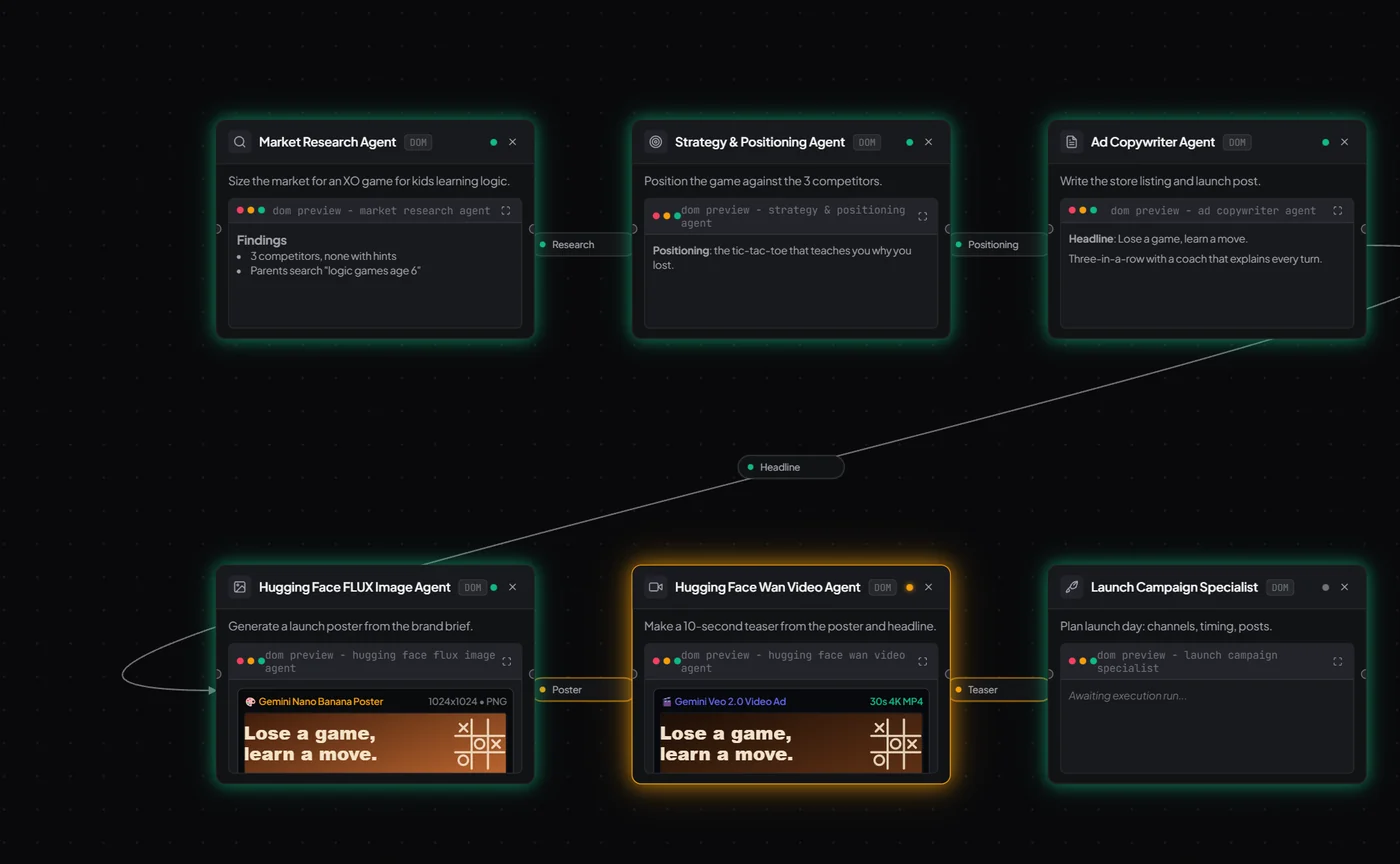
Research, strategy, brand, copy, poster, video, launch plan. Image (FLUX) and video (Wan) agents share the same brief, so your launch assets match your positioning.
Each agent gets the full output of the agents wired into it, plus a summary of everything else that finished.
LLM calls fail over from OpenRouter to Gemini to Groq automatically when one stalls.
Scrub through a run and read every handoff and per-connection log after the fact.
Bring your own API keys. State lives on the canvas, not in a chat session that expires.
Write the goal the way you’d brief a teammate. Attach a reference file if you have one.
A graph of agents appears on the canvas, each with a role, a deliverable and its upstream inputs.
Agents run in dependency order, stream their output, and save deliverables to your workspace.
You can already run agents in terminal tabs, chat windows or workflow builders. Here’s what changes when they share one canvas.
| What you need | Autumn | Terminal tabs / tmux | Chat windows | Workflow builders |
|---|---|---|---|---|
| See every agent’s status at once | ● Live node status + logs | ○ Check each pane | ○ One chat at a time | ◐ Run history |
| Agents pass context to each other | ● Automatic, along wires | ○ You copy-paste | ○ You copy-paste | ◐ Manual field mapping |
| Claude Code + Codex in one flow | ● Both are nodes | ◐ Side by side, unaware | ○ | ○ Not built for CLI agents |
| Build the workflow from a sentence | ● One prompt | ○ | ○ | ○ Drag and configure |
| Survives a provider limit | ● Failover + canvas state | ○ Session lost | ○ Start over | ◐ Retries |
| Launch assets, not just code | ● Copy, poster, video, plan | ○ | ◐ Separately | ◐ With plugins |
We went through what builders post on r/ClaudeCode, r/vibecoding and r/SaaS about running AI coding agents. These are the recurring questions, with straight answers.
Autumn is a visual multi-agent canvas for agent orchestration. You describe a goal, and Autumn builds a graph of AI agents (Claude Code, Codex, Antigravity, plus research, strategy, branding, copy, image, video and launch agents), connects them, and runs them in order. Each agent passes its output downstream as context.
Put both on the Autumn canvas as nodes and wire them. Claude Code’s output becomes Codex’s input automatically, so Codex reviews exactly what Claude wrote. Give the reviewer a strict deliverable, such as “list blocking bugs with file and line,” and you approve the result instead of relaying it.
Every node on the canvas shows its live status (idle, ready, working, completed or error), its streaming output and a mini terminal. A minimap and timeline replay show the whole run, and per-connection logs show what moved between agents.
Give each agent one narrow job and the files it owns, and make the downstream agent build on the upstream output instead of editing in parallel. Autumn makes this the default shape: every node has a defined role and deliverable, runs in dependency order, and shows its output before the next step starts.
In Autumn the plan, the decisions and each agent’s output live on the canvas, not in one chat session. When one agent hits its limit, another node, such as Codex or Antigravity, can pick up from the same upstream context. LLM calls also fail over automatically from OpenRouter to Gemini to Groq.
They often are, when handoffs are lossy and nobody can see them. Autumn passes the full output of directly wired agents rather than a summary, and makes every handoff inspectable. The rule we recommend: only add an agent when its output is checkable, and keep simple jobs to one node.
Autumn chains research → positioning → copy → poster (FLUX) → video (Wan) → launch plan, so every asset comes from the same brief and matches. For a demo video, pair it with a real screen recording and captions. A short clip of the actual product beats generic footage.
Autumn runs on your own API keys, so set hard monthly limits in each provider dashboard and use a separate key per project. Runs are a finite graph executed once in dependency order, not an open-ended loop. Per-run budget caps and per-node cost tracking are not in the beta yet.
The beta runs locally on your own machine with your own keys. Treat terminal agents like any CLI agent: point them at a dedicated project folder, keep backups or git, and review output before you ship it. Sandboxed execution for terminal nodes is not in the beta yet.
Solo founders, indie hackers and small teams who build with AI coding agents and want one place to orchestrate them, from the first line of code to the launch post.
Autumn is free during the private beta. You bring your own model API keys (OpenRouter, OpenAI, Gemini, Groq). Join the waitlist to get access.
We’re onboarding builders in small batches. Join the waitlist and we’ll email you when your spot in the next batch opens.
Get access with the next beta batch, plus early build notes.
We’ll email you when your beta spot opens.